


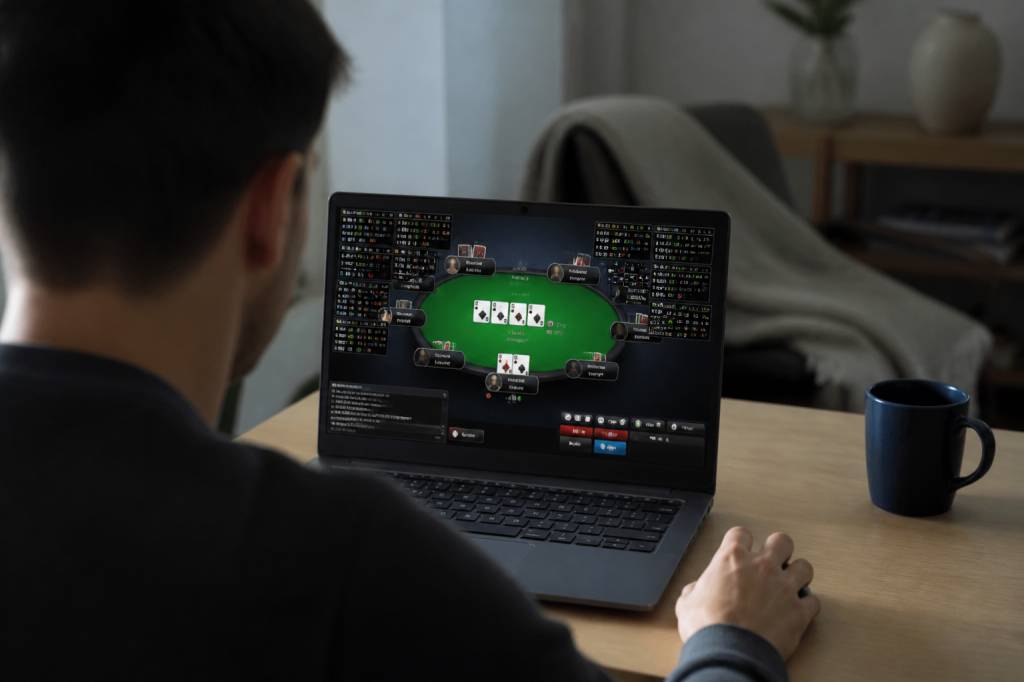
A good poker HUD can feel like having a quiet analyst sitting beside you, taking notes while you focus on the action. It can also feel like being handed the controls of a small spaceship with no instruction manual. One minute you are happily watching flops; the next, you are staring at VPIP, PFR, 3-bet, WTSD and a rainbow of coloured numbers wondering whether you are playing poker or monitoring air traffic.
For PokerStars players, the right HUD is not about collecting the largest number of statistics. It is about displaying useful information at the right moment, without turning your table into a spreadsheet. Used responsibly, a HUD can help you identify patterns, review your decisions and avoid expensive assumptions. Used badly, it can encourage lazy autopilot and convince you that a player is a maniac after seeing him play three hands.
Here is my practical guide to choosing and using a HUD on PokerStars, including the tools worth considering, the statistics that matter and the mistakes I learned to stop making the expensive way.
What a poker HUD actually does
HUD stands for Heads-Up Display. It is software that works alongside a compatible poker tracker and displays statistical information about opponents while you play. The data normally comes from hand histories saved by the poker client.
A HUD might show how often an opponent voluntarily puts money into the pot, how frequently they raise before the flop, how often they attempt a continuation bet and how many hands are included in the sample. Instead of relying only on instinct, you gain a numerical record of observed behaviour.
That does not mean the numbers tell the whole story. A HUD does not know whether your opponent has just lost a large pot, is playing four tables at once or has decided that today is the day to bluff every river. It provides clues, not verdicts.
The best players use HUD statistics as part of a wider decision-making process. They combine the numbers with position, stack sizes, betting patterns, timing, board texture and recent action. In other words, the HUD is a sat-nav, not a chauffeur.
Check PokerStars rules before installing anything
This is the unglamorous but essential part. PokerStars has rules governing third-party software, and those rules can change. Some tracking and HUD functions may be permitted, while tools that provide real-time advice, automatically make decisions, mine data from hands you did not play or perform prohibited automation may not be allowed.
Before using any HUD, read the current PokerStars third-party tools policy and check whether your chosen software appears on the permitted list. Do not rely on an old forum post from 2017 written by somebody called “RiverKing88”. Poker software policies evolve, and an outdated recommendation is not a legal defence.
In particular, avoid software that:
- Provides automated advice or tells you which action to take.
- Uses data from hands you were not involved in, where that practice is prohibited.
- Automatically clicks buttons, selects tables or performs actions for you.
- Creates seating advantages or exploits information unavailable through normal play.
- Attempts to disguise prohibited functionality from the poker site.
Popular tracking programs can have different features, and a permitted program may still become problematic if it is used with an unauthorised add-on. When in doubt, contact PokerStars support before playing real-money games with the software enabled.
Choosing the right HUD software
There is no single best HUD for every player. Your ideal choice depends on your game, budget, operating system, willingness to customise and tolerance for technical tinkering.
PokerTracker 4
PokerTracker 4 is one of the established names in online poker tracking. It offers detailed database analysis, custom reports, filters and HUD configuration. It is particularly useful for players who enjoy reviewing sessions in depth and examining how their strategy performs in different situations.
Its strength is flexibility. You can create dashboards for cash games, tournaments, sit-and-gos and specific positions. The downside is that the number of options can be intimidating. The first time I opened the configuration menus, I felt like I had accidentally applied for a job in data science.
Hold’em Manager 3
Hold’em Manager 3 is another popular choice, with a strong emphasis on live statistics, hand review and customisable displays. Many players like its clean interface and the way it presents reports after a session.
It is a good fit if you want a polished HUD with plenty of analytical depth. As with any serious tracker, take time to learn the software before playing important stakes. A badly configured HUD is worse than no HUD because it creates false confidence.
Hand2Note and other alternatives
Hand2Note is known for detailed statistical analysis and advanced pop-up configurations. Other tools may be available depending on your location, game format and PokerStars’ current software policy.
When comparing products, consider the following:
- Does it officially support your PokerStars game format?
- Is the current version compatible with your operating system?
- Can it import PokerStars hand histories correctly?
- Is the HUD easy to read while multitabling?
- Does the software offer a trial or affordable entry plan?
- Can you disable features that may conflict with PokerStars rules?
- Does it provide useful post-session analysis rather than just colourful numbers?
Do not choose a tracker because it has the most statistics. Choose one that helps you make better decisions and review your play honestly.
The essential HUD statistics
A beginner’s HUD should be simple. Four to six core statistics are enough to build a useful picture of an opponent. You can add more later when you understand exactly what each number means.
VPIP: Voluntarily Put Money In Pot
VPIP shows how often a player voluntarily invests chips before the flop, excluding forced blinds. A high VPIP generally indicates a loose player, while a low VPIP often suggests a tighter range.
For example, a player with 45% VPIP is entering many pots. That does not automatically mean you should call them down with any two cards, but it suggests their range may be wider than average.
PFR: Pre-Flop Raise
PFR measures how often a player raises before the flop. The gap between VPIP and PFR can be particularly informative.
A player with 22% VPIP and 18% PFR is likely entering pots aggressively. A player with 40% VPIP and 7% PFR may be calling or limping far too often. Against the second profile, raising for value becomes attractive, especially when you have position.
3-bet percentage
This statistic shows how often a player re-raises before the flop. A high 3-bet number can indicate aggression, although it may also reflect a small sample or a player who only 3-bets from certain positions.
Do not look at a 3-bet percentage in isolation. A 3-bet of 10% across 1,000 hands tells you more than 10% across 20 hands. Your opponent may simply have picked up aces twice and kings once.
Attempt to steal
This measures how often a player raises from late position when attempting to win the blinds. It is especially useful in six-max cash games and tournaments, where blind pressure is a major part of the strategy.
If a player is stealing frequently from the button, you may be able to defend your blinds more actively or re-raise with a suitable range. But position still matters. A steal percentage from the button is not the same as a steal percentage from early position.
Continuation bet
The continuation-bet statistic shows how often a player follows up a pre-flop raise with a flop bet. A high c-bet percentage may identify someone who applies pressure automatically. A low percentage may indicate a player who bets more honestly or prefers to check back marginal hands.
Board texture matters. A player who c-bets 80% on dry ace-high boards may not be equally aggressive on coordinated low flops. Numbers become powerful when combined with context.
WTSD and W$D
WTSD, or Went to Showdown, shows how often a player reaches showdown after seeing the flop. W$D, or Won Money at Showdown, indicates how often they win when reaching showdown.
A high WTSD with a low W$D can suggest a player who calls too much. A low WTSD with a high W$D may point to a cautious player who arrives at showdown with strong hands. Again, sample size and game conditions matter.
Sample size: the number that saves you from embarrassment
The biggest HUD mistake is treating a tiny sample as a permanent personality profile. If an opponent has played five hands and raised twice, the HUD may show a 40% PFR. That does not make them a fearless pre-flop assassin. It makes them a person who has played five hands.
As a rough guide, pre-flop statistics become more useful over a few hundred hands, while many post-flop statistics require considerably larger samples. Some niche statistics may need thousands of observations before they become reliable.
Until the sample grows, use descriptive language rather than absolute labels. Think “possibly loose” rather than “confirmed maniac”. Think “this player has shown aggression recently” rather than “this player always bluffs”. Poker punishes certainty with remarkable efficiency.
Build a clean, readable HUD
Your HUD should help you make decisions in seconds. It should not cover the board, obscure stack sizes or force you to squint at eight rows of microscopic text.
A practical beginner layout might include:
- Player name and number of hands.
- VPIP and PFR.
- 3-bet percentage.
- Fold to 3-bet.
- Flop continuation bet.
- Attempt to steal.
- Fold to continuation bet.
- WTSD, if you have a meaningful sample.
Use colour coding carefully. Colours can make trends easier to recognise, but an aggressive red-green-blue display can become visual soup. Choose a small number of thresholds and make sure the same colours mean the same thing across every table.
Position the HUD so it stays attached to the correct player. This sounds obvious, yet a misplaced panel can lead you to believe the tight regular on your left is a loose recreational player. I have made this mistake before. The table did not applaud my innovative interpretation of reality.
Use the HUD to adjust, not to stereotype
Suppose you identify a player with 38% VPIP, 8% PFR and a high fold-to-c-bet figure. Your adjustment might be to isolate them pre-flop with a wider value range, bet good hands confidently and avoid attempting elaborate bluffs when they suddenly show strength.
Now imagine another player with 24% VPIP, 21% PFR and a high 3-bet percentage from the blinds. Against this profile, opening every button may not be ideal if they respond aggressively. You might tighten your weakest opens, call with hands that play well post-flop or choose selective four-bet bluffs where appropriate.
The correct adjustment depends on the situation. A HUD statistic is not an instruction. It is a reason to ask a better question:
“Given this player’s tendencies, how does my hand perform against their likely range in this position and stack configuration?”
HUDs in tournaments versus cash games
HUD statistics can behave differently across formats. Cash-game players often sit with similar stack depths for long periods, making positional and post-flop data easier to interpret.
Tournament conditions change constantly. Stack sizes, antes, payout pressure and table dynamics can transform a player’s strategy. A player with a low overall VPIP may become extremely active near a final table, while a normally aggressive opponent may tighten dramatically around pay jumps.
For tournaments, include stack sizes and position in your thinking. A 20-big-blind open is not the same strategic event as a 100-big-blind open. The HUD can provide background information, but tournament context must remain in the driver’s seat.
Review your own numbers after every session
The most valuable use of a HUD may happen after you close the tables. Review your own statistics, but do not obsess over whether they match somebody’s favourite online poker chart.
Look for practical leaks:
- Are you entering too many pots from early position?
- Are you folding too often to three-bets?
- Are you defending the big blind without a clear plan?
- Are your continuation bets automatic on unsuitable boards?
- Are you reaching showdown too often with weak bluff-catchers?
- Are you playing significantly differently when multitabling?
Filter your database by position, hand strength, pot type and stack depth. Review the largest pots first, but also inspect repeated small losses. A thousand tiny leaks can quietly become one very expensive whale.
Common HUD mistakes to avoid
The first mistake is adding too many statistics. More information does not guarantee better decisions. The second is ignoring sample size. The third is staring at numbers instead of watching the hand.
Another common error is using the HUD to justify a decision you already wanted to make. “His fold to river bet is high, so my queen-high bluff is definitely brilliant” is often just a fancy way of saying “I felt like clicking bet.”
Finally, do not allow a HUD to replace fundamental poker skills. Ranges, position, pot odds, bet sizing, bankroll management and emotional control still matter. No software can stop you from calling a river bet because you were annoyed that the opponent had been winning.
A sensible starting setup
Start with one permitted tracker, one simple HUD and a clear review routine. Play enough hands to build meaningful samples, while remembering that your opponents are not static computer characters. They adapt, tilt, change tables and occasionally wake up with pocket aces.
Use the HUD to notice patterns, then verify those patterns through observation and hand review. Keep your display clean, respect PokerStars’ current rules and remove any statistic that you cannot explain or apply.
The right HUD will not turn a casual player into a crusher overnight. It will, however, make your decisions more informed and your post-session analysis more honest. That is a valuable edge. In poker, even a small edge becomes significant when you apply it consistently—and unlike a miracle river card, consistency is something you can actually control.